

After four years on DigitalOcean, I explored cheaper VPS alternatives and evaluated OVH as a potential replacement. Through load testing and hardware analysis, OVH proved faster, more scalable, and better equipped to handle traffic thanks to more CPU cores, additional RAM, and efficient PHP process management. This comparison highlights the importance of assessing both hardware and software configuration when choosing a hosting provider.
Rethinking DigitalOcean After Four Years
I have been using DigitalOcean as my primary hosting provider for about four years. During that time, my setup was intentionally simple: a single Virtual Private Server located in DigitalOcean’s Toronto data center. The droplet was configured with 1 vCPU, 2 GB of RAM, and 50 GB of SATA SSD storage. This VPS hosted my personal blog as well as a few low-traffic websites. From a reliability standpoint, DigitalOcean largely delivered what it promised: stability, predictable uptime, and a clean, well-designed control panel.
However, over time, the cost-to-value equation started to feel increasingly unbalanced. The droplet cost roughly 230 CAD per year, which is not insignificant given the modest hardware configuration and the very low traffic profile of my sites. While nothing was “broken,” the setup began to feel expensive for what it actually offered. This realization did not come from a single incident, but from a gradual reassessment of my needs versus what I was paying for — and it ultimately prompted me to question whether staying with DigitalOcean still made sense.
The Search for Cheaper VPS Hosting
Once I started questioning my DigitalOcean setup, I began looking more seriously at alternative VPS providers. What surprised me almost immediately was how aggressive some of the pricing had become in the lower end of the market. Providers such as IONOS and Hostinger frequently appeared in comparisons and reviews, advertising VPS plans at prices as low as two dollars per month. On paper, these offers made my DigitalOcean droplet look significantly overpriced, and they naturally raised the question of whether I had been overpaying for years.
IONOS, in particular, initially seemed tempting. Their entry-level VPS plan promised a single vCPU, 1 GB of RAM, and 10 GB of NVMe SSD storage for around two dollars per month. However, a closer look quickly revealed several concerns. Many reviews pointed to steep renewal prices, sometimes jumping to around twelve dollars per month for the same configuration. Others mentioned confusing or aggressive billing practices, limited customer support, and friction when attempting to cancel a plan. While the upfront price was attractive, the overall experience appeared risky and potentially time-consuming — precisely the kind of operational distraction I wanted to avoid. In the end, these red flags were enough to rule out IONOS as a serious candidate.
Discovering OVH as an Alternative
After ruling out ultra-low-cost VPS providers, I turned my attention to OVH. OVH is a French hosting company with a long-standing presence in Canada, including offices in Montreal and a data center in Beauharnois, Quebec. This local footprint mattered to me in terms of support accessibility. I had also used OVH in the past, from around 2015 until I switched to DigitalOcean, and my experience at the time had been positive. Unlike some of the newer budget providers, OVH did not feel experimental or opportunistic — it felt established.
What ultimately made OVH stand out was the hardware-to-price ratio of their VPS offering. For approximately four dollars per month, OVH offered a VPS with 4 vCPUs, 8 GB of RAM, and 70 GB of NVMe SSD storage, translating to roughly 75 CAD per year. On paper, this was dramatically more powerful than my existing DigitalOcean droplet at roughly one third of the annual cost. Still, I was fully aware that specifications alone can be misleading, especially when CPU allocation and I/O performance are involved. Rather than taking the numbers at face value, I decided to treat this move as a hypothesis: migrate the site and evaluate performance objectively before drawing any conclusions.
Performance Evaluation
1. Experimentation Protocol
To evaluate real-world performance, the servers were analyzed both at the hardware and application level. CPU and memory characteristics were checked via /proc/cpuinfo and /proc/meminfo to verify actual resources. Load testing on the blog’s homepage was conducted using Locust, spawning one virtual user per second up to n users, with n ranging from 5 to 200. Each user waited for a random delay between 1 and 3 seconds between requests.
During the tests, average response times, failed requests, and CPU/memory usage (via htop) were recorded. This methodology provided a clear view of how each VPS handled increasing load and revealed any discrepancies between on-paper specs and real performance.
2. DigitalOcean Results
CPU
The DigitalOcean droplet has 1 vCPU, which maps to a single Intel x86-64 core running at roughly 2.0 GHz with no hyper-threading. This is a shared CPU, scheduled alongside other tenants on the host, with 4 MB of L3 cache exposed. There are no additional cores to parallelize workloads like PHP-FPM or MySQL.
Memory
Memory consists of ~2 GB of RAM with no swap configured. About 190 MB is completely free, and ~850 MB is available once page caches and buffers are included. Most usage comes from anonymous processes (~750 MB) and filesystem cache (~750 MB). Without swap, memory spikes could trigger OOM kills, making this setup efficient but fragile under load.
Load Test Results
Under simulated traffic, there were no failed requests, and the average response time ranged from 45 to 60 ms.
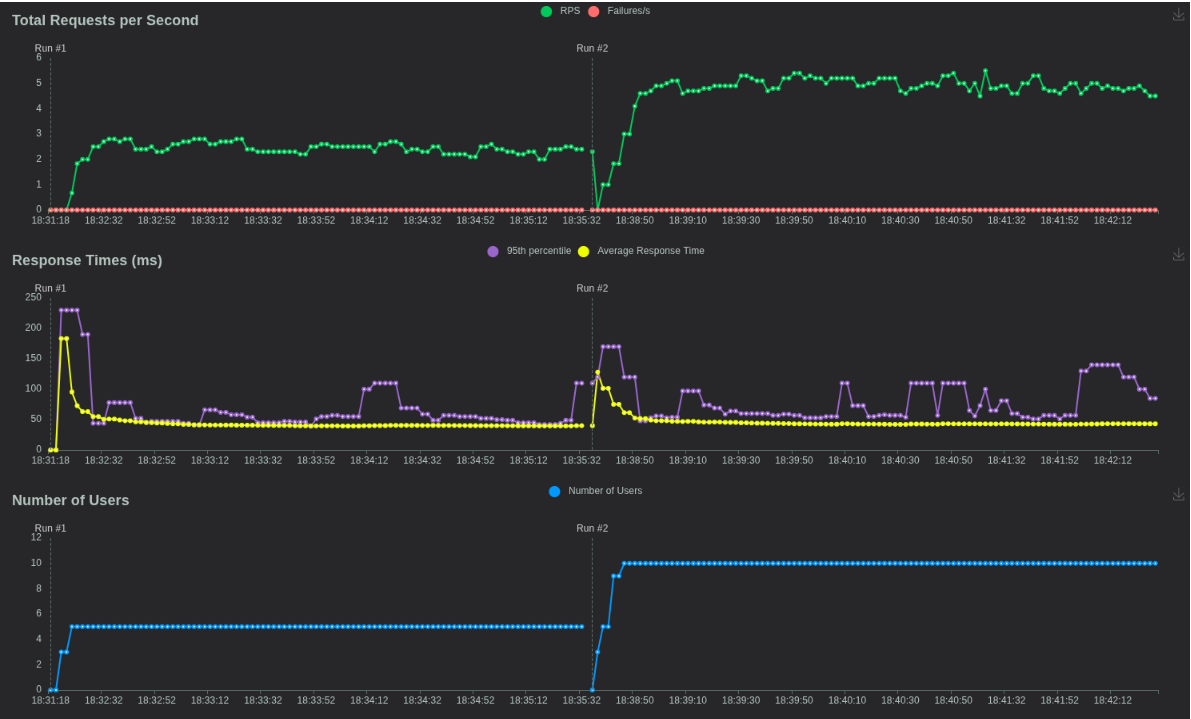
At 100 users, the single CPU core reached ~26% utilization, and memory usage was about 1 GB.

3. OVH Results
CPU
This OVH VPS exposes 4 vCPUs, each mapped to a Haswell-generation Intel Core CPU running at ~2.4 GHz. Each vCPU appears as a single core with no SMT/hyper-threading, and all cores are homogeneous. Compared to the DigitalOcean droplet, this is a major step up: four times the parallelism, higher clock speed, and a much larger L3 cache footprint (16 MB per vCPU), which benefits PHP-FPM and MySQL under load.
Memory
Memory consists of ~8 GB of RAM with no swap configured. About 2.5 GB is free, and ~6.6 GB is available once caches and buffers are accounted for. Most usage comes from filesystem cache (~4 GB) and anonymous memory (~780 MB) used by PHP-FPM and MySQL. Without swap, spikes could trigger OOM kills, but the system has ample headroom for typical blog traffic.
Load Test Results
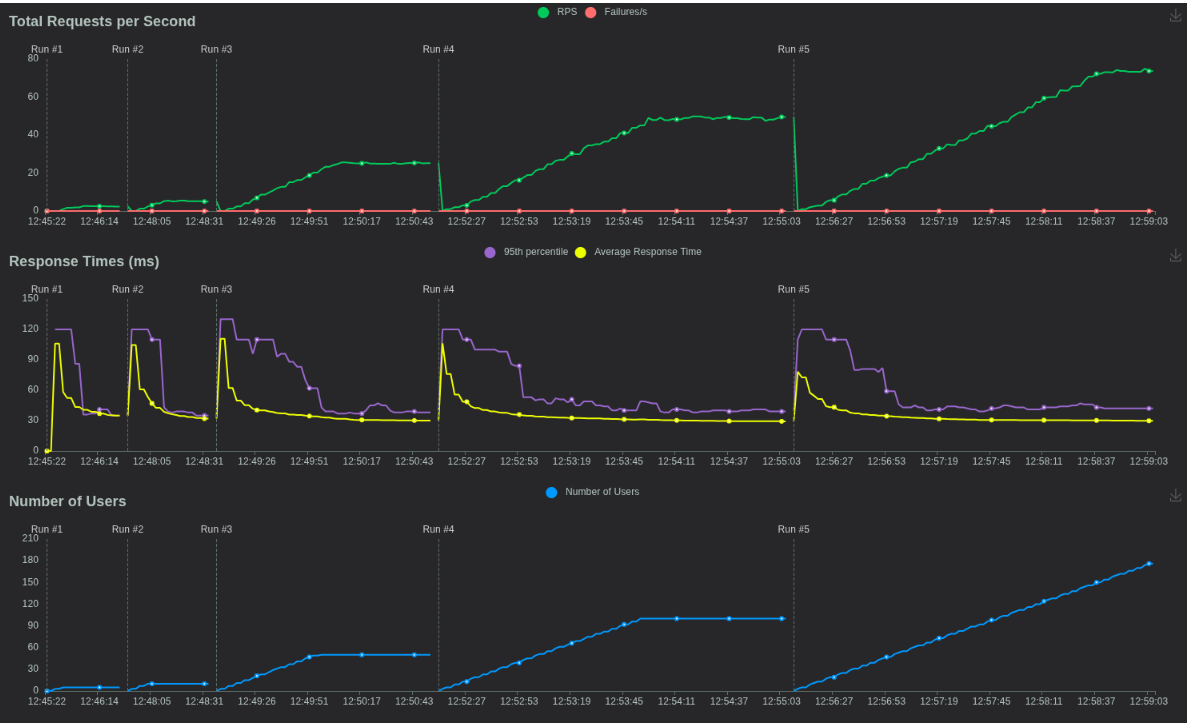
Under normal load (up to 185 active users), there were no failed requests, with average response times of 30–35 ms.
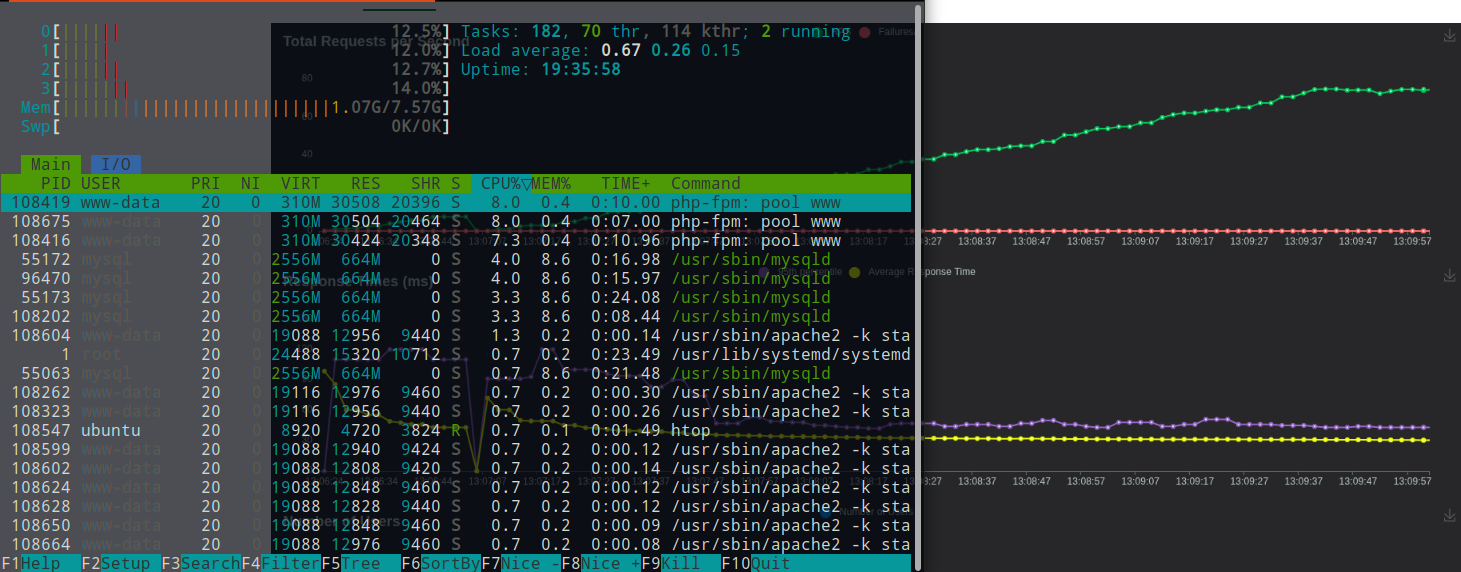
CPU cores were evenly utilized at ~13%, and memory usage remained around 1 GB. Using php-fpm instead of Apache mod_php allowed a more efficient distribution of PHP processes across multiple cores.
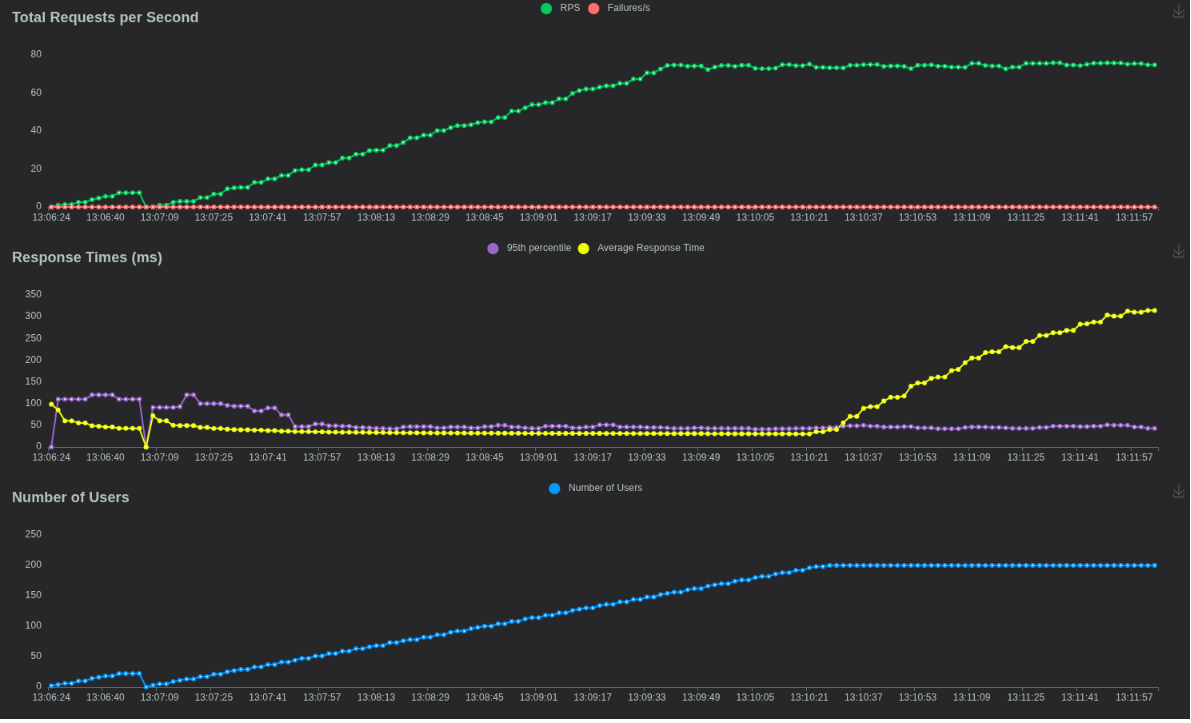
When the simulation ran longer for 200 users, the average response time rose to ~314 ms, highlighting how sustained high concurrency can stress even a multi-core setup.
Overall, the comparison clearly illustrates how much difference VPS specifications and configuration can make in real-world performance. While the DigitalOcean droplet handled moderate traffic reliably, the OVH VPS delivered superior responsiveness and scalability under higher loads, thanks to additional CPU cores, more RAM, and efficient process management with php-fpm. These results confirm that evaluating both hardware and software configuration is critical when choosing a hosting provider, rather than relying solely on advertised specifications or price.