

From AI Code Reviewer to AI Collaborator
For the past two years, I have been using AI tools primarily as assistants during development. Most of the time, this meant asking chatbots to review small pieces of code—typically individual functions—or to suggest libraries that might be useful for a new project. In that role, AI behaved mostly like an on-demand code reviewer or a quick source of technical recommendations.
After reading Beyond Vibe Coding by Addy Osmani, I became interested in applying the ideas from the book to a real software engineering project. The book explores how AI can be integrated more deeply into the development process rather than being used only for isolated tasks such as code completion or occasional code reviews. I wanted to see what would happen if I followed this approach from the beginning of a project.
For several years, I had been thinking about building a small web application to manage my personal library. My collection includes paper books, digital books, and some audiobooks, and I had never found a free application that fully matched my needs. This made the idea a good candidate for experimentation: the requirements were clear, the scope was manageable, and the project was something I genuinely wanted to use.
The librarian application therefore became a practical experiment. Instead of using AI only for occasional help, I decided to incorporate it directly into the software engineering process and observe how far it could take the project—from the earliest design decisions to the first working version of the application.
Brainstorming the Architecture with AI
I started the project by brainstorming the technology stack and the architecture of the application. For this stage, I turned to ChatGPT. In my experience, the broad technical knowledge of large language models makes them particularly well suited for early design discussions and technology exploration.
To structure the conversation, I first set the persona of the chatbot to act as a senior software architect whose role was to help me make design decisions for the librarian application. I then provided a brief description of the core requirements. The application would be a simple CRUD system allowing me to enter books into my collection, list them, and search them by attributes such as title, author, or description.
ChatGPT immediately started asking clarifying questions about the project. For example, it asked whether the application was intended for personal use or for multiple users, and whether it would be deployed publicly on the Internet or run locally in a controlled environment. Answering these questions helped narrow down the architectural options and triggered a productive brainstorming session.
I also shared some of the architectural characteristics I already had in mind. I planned to build the librarian as a two-tier application, with a backend Books API and a separate frontend. I was also considering using Elasticsearch to support full-text search.
ChatGPT challenged some of these assumptions. Since the application was intended to run locally, it suggested skipping authentication entirely. It also questioned the use of Elasticsearch, describing it as unnecessary complexity for a small personal project. Instead, it recommended using SQLite as the persistence layer. I raised concerns about scalability and full-text search capabilities, and after some back-and-forth we eventually settled on PostgreSQL instead. We also agreed that using an ORM would add unnecessary complexity for a project of this size.
For the frontend, I imposed a few hard requirements: the code had to be written in TypeScript, the user interface would use Svelte for reactivity, and the application would be built using Vite. On the backend side, I initially considered using ExpressJS for the API, but ChatGPT suggested the Fastify framework instead. Since I did not have a strong preference for Express and saw this as an opportunity to learn something new, I accepted that recommendation.
Interestingly, ChatGPT also questioned my decision to split the system into two tiers with a separate API. In the end, I still decided to keep the two-tier architecture, though I am not entirely convinced today that this was the optimal choice for such a small application.
After a few iterations, we converged on a set of architectural characteristics for the project. At that point, ChatGPT already had all the necessary context, so I asked it to generate the prompt that would be used to instruct another AI system to build the initial version of the application. The result was a detailed prompt of roughly two pages describing the requirements, the architecture, and the expected structure of the project.
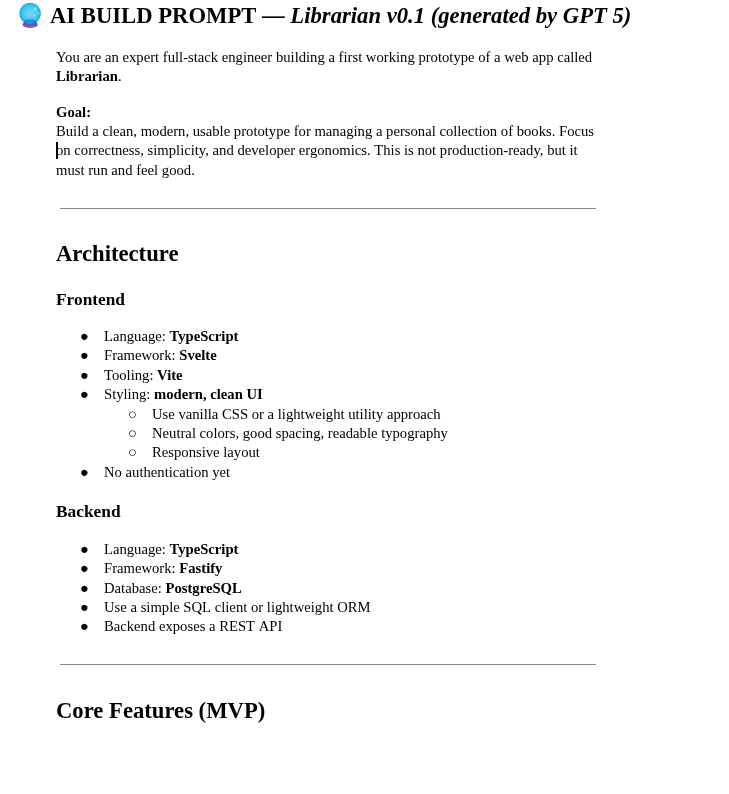
The entire brainstorming session took less than thirty minutes. In many ways, it resembled the kickoff or technical validation meetings that take place in traditional software engineering projects, where engineers, product owners, and designers gather to discuss the direction of a new system. The difference was the speed. What might normally require several meetings—and sometimes a fair amount of unproductive discussion—was completed in a single focused interaction.
Brainstorming with AI turned out to be extremely efficient. There were no competing preferences, no egos involved, and no digressions into unrelated topics. The discussion focused almost entirely on technical trade-offs and practical decisions. Another benefit is that AI systems often suggest technologies or approaches that engineers might not initially consider, creating opportunities to explore new tools and expand one's technical perspective.
Building an MVP in Minutes
Once the architecture was defined and the prompt generated, it was time to see how quickly AI could build a working application. One of the questions that motivated this experiment was simple: how far could an AI agent go if given a sufficiently detailed prompt?
To find out, I gave the prompt generated by ChatGPT to GitHub Copilot, specifically through the Copilot plugin in VSCode. Copilot immediately started scaffolding the project. It created the directory structure for both the backend and the frontend, defined the dependencies, and installed the required packages.
The entire process took roughly one to two minutes.
The first attempt did not run successfully because of a few incompatible npm packages. I asked Copilot to resolve the problem. The agent removed some of the offending dependencies that were not strictly required—mostly debugging utilities such as Svelte Inspect—and chose the path of least resistance to make the project build successfully.
At this point, the application still needed a persistence layer. To solve that problem, I again turned to ChatGPT and asked it to help me set up a PostgreSQL environment. ChatGPT suggested a suitable PostgreSQL Docker image, walked me through downloading it, and helped configure a container that could run as a Linux service. I also used ChatGPT to set up a separate PGAdmin container to manage the database.
In about twenty to twenty-five minutes from the start of the project, I had a working two-tier web application.
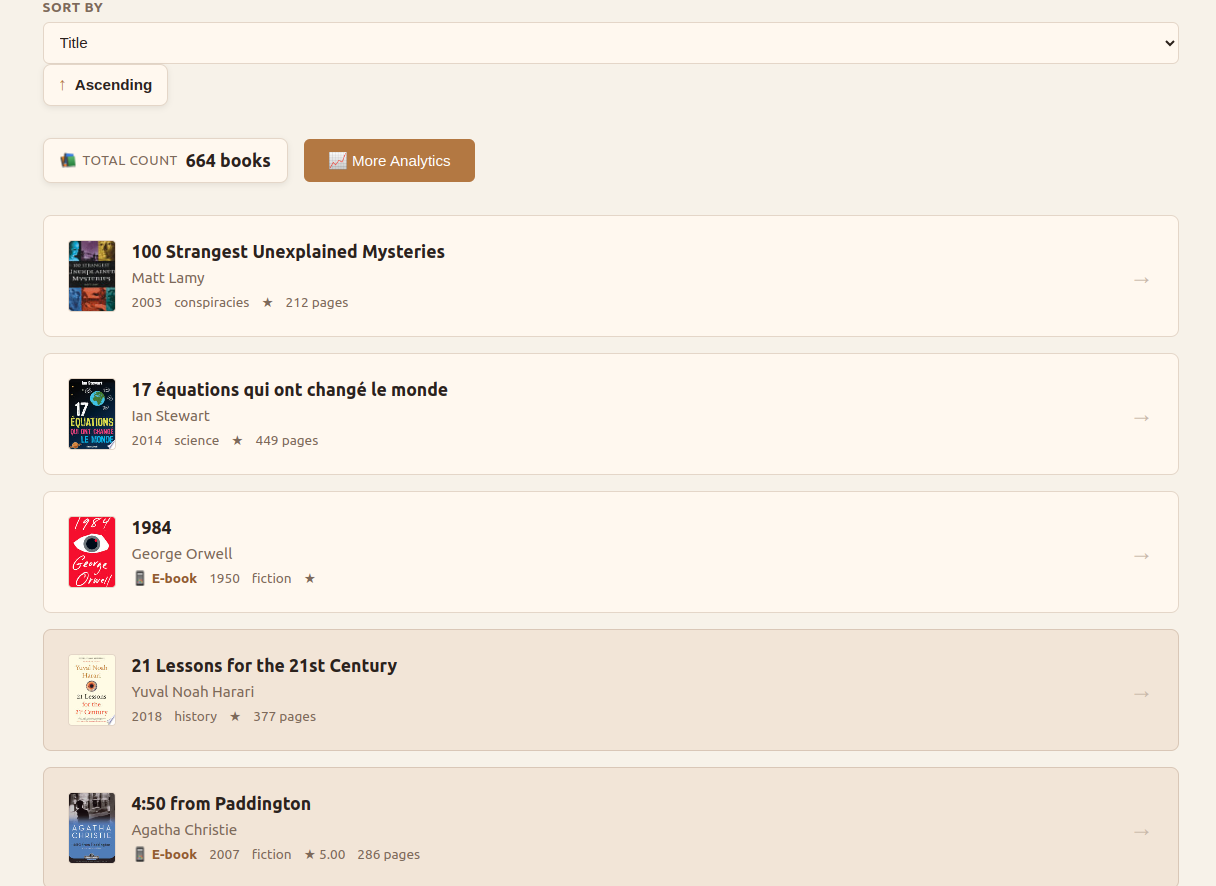
According to Beyond Vibe Coding, however, code generated by AI should never be accepted blindly. It must be reviewed carefully, just like code written by a junior developer. With that in mind, I started reviewing what Copilot had produced.
I began with the backend. The generated API was essentially a monolith: most of the code was placed in a single index.ts file containing route definitions, request handlers, and SQL queries. To improve the design, I asked Copilot to refactor the code following the MVC architectural pattern.
The agent responded by creating a BookController, but the architecture was still far from ideal. For instance, the SQL queries were placed directly in the controller class, creating a classic “fat controller.” The Book model class also had design issues, as it resembled another class that represented the payload of the book creation endpoint.
I asked Copilot to continue refactoring the backend and suggested introducing more explicit components such as a BookRepository. This iterative refactoring helped clarify the architecture and provided a good opportunity to review the generated code in detail.
One interesting observation emerged from this process: while Copilot was very effective at producing functional code quickly, it struggled to apply well-established architectural patterns consistently. It also had difficulty identifying clean boundaries between components. For example, parts of the business logic occasionally ended up inside repository classes.
Despite these design imperfections, the first working version of the application had been created in less than half an hour. From a purely productivity standpoint, that was impressive.
When the AI Leaves: Owning the Codebase
With the initial version of the application running, I wanted to experiment further by adding new features using AI assistance.
The first feature I implemented was an auto-suggest mechanism for book creation. When entering a book title in the creation form, the application would call a third-party API to retrieve book metadata and suggest possible matches. Selecting a suggestion would automatically populate fields such as authors, description, or ISBN, making it much faster to enter books into my collection.
ChatGPT suggested two possible APIs for this feature: the Open Library API and the Google Books API. The Google API provided a free tier of about 1,000 requests per day and had broader coverage, so I asked Copilot to implement an auto-suggest feature that would query Google Books first and fall back to Open Library when no results were found.
Copilot successfully implemented the feature. It called the appropriate endpoints, parsed the JSON responses, and implemented the fallback logic between the two APIs. AI proved very helpful in this type of task because it removed the need to manually study API documentation or response formats.
However, the implementation revealed another limitation. The code was once again written in a monolithic style, with several functions placed in the same file. More importantly, the calls to the book APIs were implemented in the frontend codebase. This introduced a security issue: the Google Books API key was effectively shipped with the frontend application and could be exposed to end users.
For an application deployed locally this was not a major concern, but a more secure design would have created proxy endpoints in the backend API and forwarded the requests to the external services. That approach would have allowed the API keys to remain on the server side.
About three hours after the beginning of the project, I encountered an unexpected constraint: I ran out of Copilot credits. The AI autocomplete quota and the free agent messages were exhausted, and the credits would not replenish for another thirty days.
In a sense, this marked the end of the pure “vibe coding” phase of the project.
From that point on, I had to take full ownership of the codebase. Interestingly, this was not a bad thing. Many people who experiment with vibe coding talk about the “last mile problem.” AI can get you to roughly 70% of a project very quickly, but the remaining 30% often requires careful engineering work. Developers who never took the time to understand the generated code can find themselves unable to finish the project or fix bugs later on.
I then shifted my attention to reviewing the frontend code generated by Copilot. The structure of the UI was generally reasonable. The agent had created separate Svelte components for the main application shell, the book list, the search box, and the book creation form.
However, I soon noticed a major issue. The generated code used Svelte 4 syntax, even though the project was intended to use Svelte 5.
Svelte 5 had been released more than a year earlier, but the original prompt simply specified “Svelte” without constraining the version. Copilot therefore defaulted to the version that appeared most frequently in its training data.
At that moment I realized that I had inherited technical debt only a few hours after starting the project.
To solve the problem, I collaborated with ChatGPT to migrate the application to Svelte 5. The process turned out to be more complicated than expected. ChatGPT initially attempted to upgrade the existing dependencies in place, which resulted in a number of inconsistent npm packages and failed builds.
Eventually the solution was to remove the existing node modules entirely and rebuild the dependency tree from scratch. Even then, the application initially started with a blank page and console errors.
Svelte’s official documentation describes version 5 as “mostly backward compatible,” but in practice several changes were required. I ran the migration script provided on the Svelte website, which introduced the new runes-based syntax, but the application still failed to run due to deprecated event emitters.
At that point ChatGPT began proposing increasingly unreliable fixes. This highlighted another weakness of AI systems: they often struggle when dealing with relatively new or less widely used libraries. The correct solution eventually came from reading the official migration guide, which explained that event emitters should be replaced with callback properties.
The migration process took about three hours in total. Much of that time could probably have been saved by consulting the documentation earlier rather than trying to force AI to solve the problem.
Once the migration was complete, the application was running again with Svelte 5.
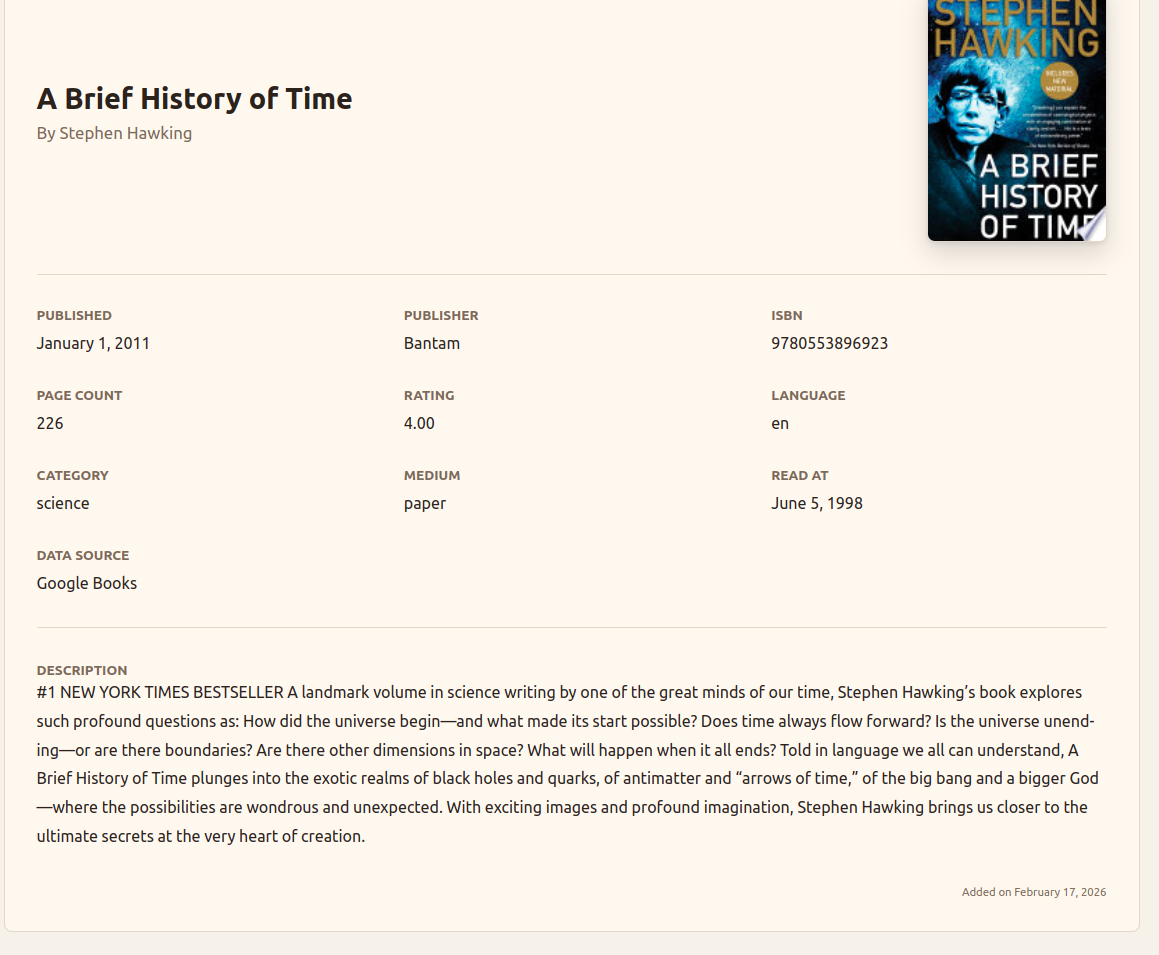
During this phase I also started using another tool: the Codex plugin for VSCode. With Codex I continued improving the application by adding an edit book feature, introducing filters for the book list (such as language, category, and unread books), and refining the visual design of the interface. I even asked the agent to suggest a color palette better suited for a librarian application.
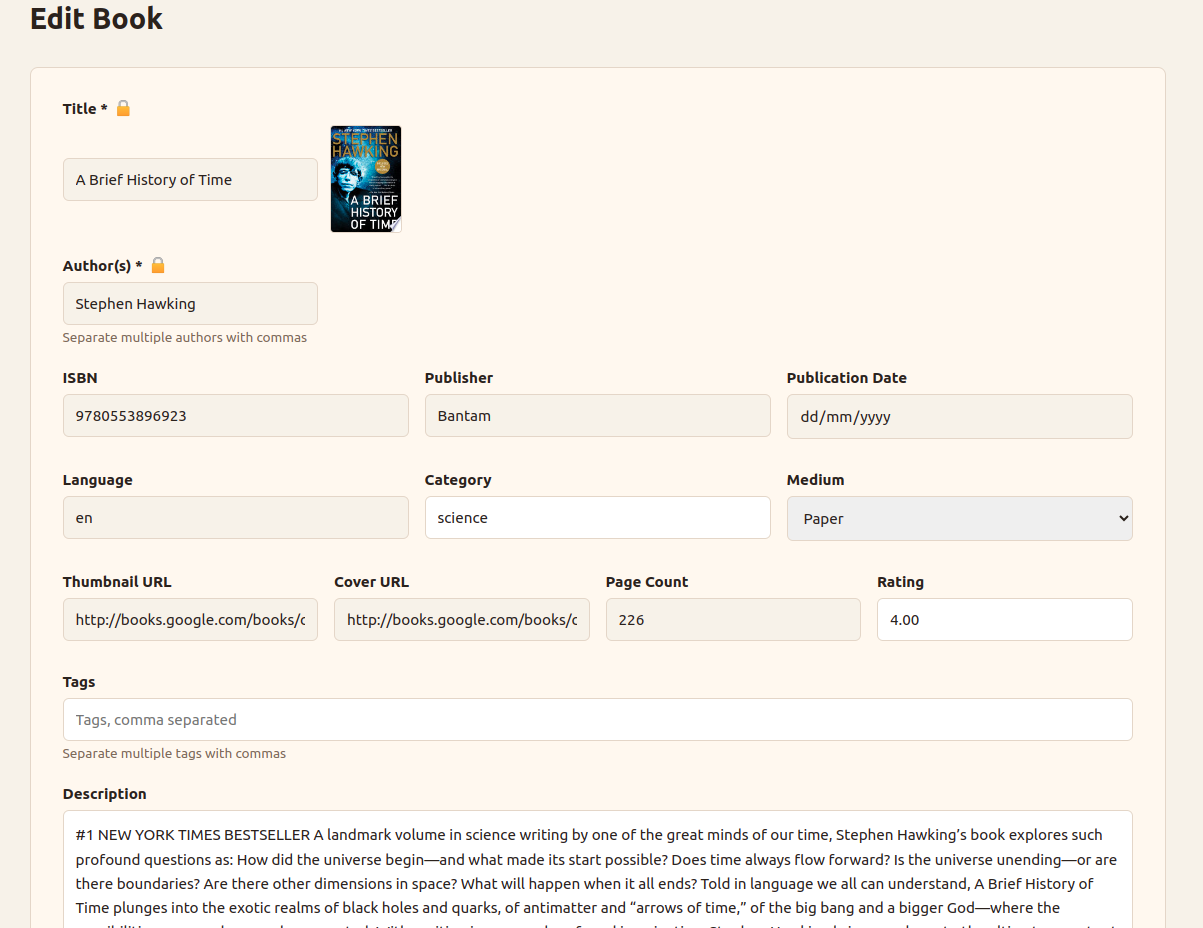
Adding these features took another couple of days. At this stage, the workflow felt less like pure vibe coding and more like AI-assisted software engineering. My prompts were shorter and more precise, and I sometimes asked the agent to implement very specific components such as interfaces, data classes, or API clients.
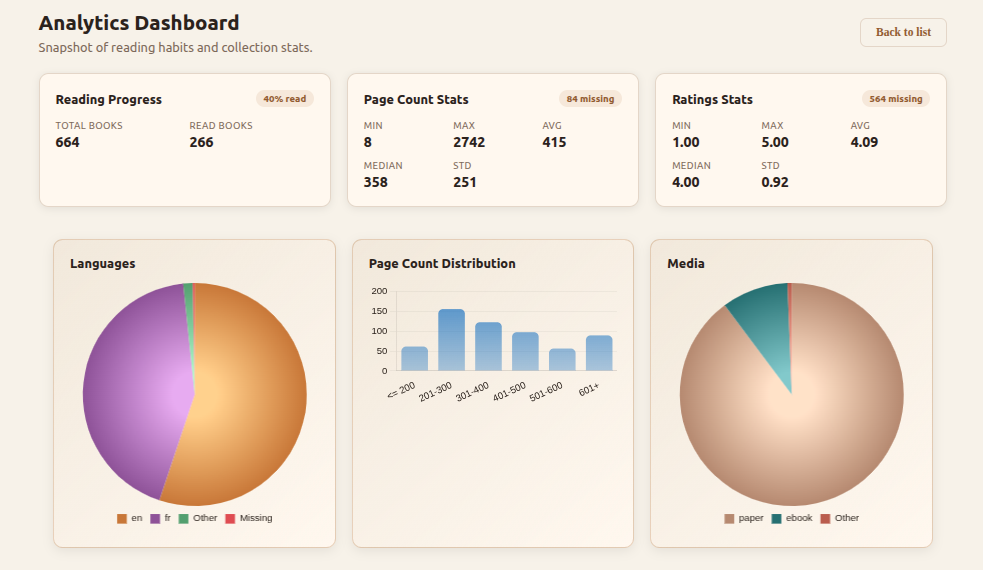
Finally, I added an analytics dashboard to the application. The dashboard displays several statistics about my library: the number of books in the collection, the percentage of books already read, the distribution of page counts, and the breakdown of the library by language, media type, and category. The implementation took about five hours for both the backend API and the frontend interface. ChatGPT suggested using Chart.js for the visualizations, and Codex generated the chart code without requiring me to study the library documentation in detail.
Lessons from Building an AI-Assisted Application
Overall, the librarian application turned out to be a very enjoyable project to work on. More importantly, it provided a practical way to observe where AI tools shine in the software engineering process and where they still struggle.
From a productivity standpoint, the results were impressive. The initial application was scaffolded in minutes, and a working two-tier web application was running in less than half an hour. Even after spending time reviewing code, refactoring the backend, migrating the frontend to Svelte 5, and adding several additional features, the entire project took under 30 hours to develop. That is significantly faster than what a traditional solo development process would likely require.
One area where AI performed particularly well was brainstorming and early architectural discussions. Using a chatbot to simulate a conversation with a senior architect turned out to be extremely effective. It helped surface design trade-offs quickly, challenged some of my initial assumptions, and even suggested technologies that I might not have considered otherwise. Generating the initial prompt for the MVP from that brainstorming session also proved to be a useful step.
AI also performed very well when integrating common libraries and external APIs. Implementing the book auto-suggest feature, for example, required interacting with the Google Books API and the Open Library API. AI was able to handle the endpoint calls, JSON parsing, and fallback logic without requiring me to spend much time studying the API documentation. Later in the project, the same pattern appeared again when integrating the charting library used for the analytics dashboard.
However, the experiment also exposed several weaknesses.
One recurring issue is that AI tools do not naturally enforce strong architectural patterns. The initial backend implementation generated by Copilot tended toward monolithic files and “fat controllers.” Clean separation of concerns and well-defined component boundaries often required explicit refactoring instructions. In other words, AI can produce a large amount of working code quickly, but it still needs architectural guidance from the developer.
Another limitation appears when AI interacts with new or less common libraries. The migration from Svelte 4 to Svelte 5 illustrated this clearly. Because the newer version had less representation in training data, ChatGPT struggled to diagnose the problem and began proposing incorrect solutions. In situations like this, the most reliable approach remains the traditional one: reading the official documentation.
This experience also revealed how quickly technical debt can appear in an AI-generated project. At one point I joked that the project already contained legacy code only three hours after its creation. In reality, that technical debt may have appeared even earlier—possibly within the first twenty seconds after submitting the initial prompt.
In some ways, the process resembles a small Big Bang. The initial prompt triggers the rapid creation of a codebase, and from that moment the application begins to expand and evolve. Just like the universe after the Big Bang, the system keeps growing as new features are added. But if the initial conditions are not carefully reviewed, the project can quickly accumulate structural issues that persist as it evolves.
Another risk worth mentioning is skill atrophy. When AI produces large amounts of code in minutes, it becomes very easy to lose visibility into how the system actually works. I began to feel this effect early in the project when I realized how much code Copilot had generated in such a short time. This reinforced the importance of reviewing the generated code and taking ownership of the architecture as early as possible.
This is closely related to what many developers call the “last mile problem.” AI can bring a project to roughly 70% completion very quickly, but the remaining work often requires careful engineering and a deep understanding of the codebase. Developers who never review or understand the generated code may find themselves unable to complete the final portion of the project or maintain it over time.
Despite these limitations, the overall experience was very positive. AI significantly accelerated the early stages of development and reduced the friction involved in integrating external libraries and APIs. At the same time, the project confirmed that developers still need to guide the architecture, review generated code, and make the final design decisions.
Finally, the project is not finished. The application is already being used to catalog my personal book collection—I have entered all of my paper books and am currently adding my digital library. During that process, only one minor bug has surfaced so far, related to the search query being lost after creating a new book and returning to the list view.
Looking ahead, there are still areas of the codebase that could be improved. The frontend generated by AI works well, but it relies heavily on boolean state variables, some of which appear redundant. One possible improvement would be to model the application’s behavior more explicitly, perhaps by representing the frontend state as a state machine. This would likely lead to a cleaner and more maintainable structure, although examples of Svelte 5 applications following such patterns are still relatively scarce.
For now, the librarian application serves both as a useful personal tool and as a small case study in what AI-assisted software engineering looks like in practice.