

1. From Flash Widgets to Modern Web Apps
Around 2010, I developed a small web application to track my cycling rides and generate some statistics around them. The application stored ride information and displayed monthly and yearly summaries, mostly through pie charts and daily histograms.
The stack behind this application reflected the technologies commonly used at the time. The backend was written in PHP, backed by a MySQL database, and built on top of a lightweight MVC framework that I had developed for personal projects. The frontend was implemented as a Flash application using ActionScript 4 and the Flex 3 framework.
At the time, this was not a particularly unusual choice. The modern JavaScript ecosystem that we now take for granted simply did not exist yet in its current form. Interactive browser-based visualizations were harder to build, charting libraries were limited, and frontend frameworks were still relatively immature. Flash filled that gap by providing a runtime dedicated to rich interactive applications.
The application itself was deployed as a Flash/Shockwave widget embedded into my personal blog and restricted to authenticated users, which effectively meant that it was mostly a personal analytics dashboard for my own rides.
Over time, however, the web ecosystem moved away from Flash entirely. Browser support gradually disappeared and the application eventually stopped working. Since the project was relatively small and personal, I never invested time in rebuilding it using newer technologies.
The idea remained dormant for years until it unexpectedly resurfaced a few days ago. The trigger was fairly mundane: simply seeing people cycling outside. Around the same period, I had also been experimenting with AI-assisted development workflows while building another personal project called Librarian, an application used to manage my book inventory and generate dashboards and statistics around it.
That combination made revisiting the original cycling application feel like a natural next project. The goal was not to recreate the old application feature by feature, but rather to build a modern replacement while exploring how far current AI-assisted development workflows could accelerate the creation of a small analytics-oriented application. This new project became Pedalytics (available on GitHub)
2. Defining the MVP with AI
As with most of my recent side projects, Pedalytics started with a brainstorming session with ChatGPT powered by GPT 5.5. The initial objective was not to generate code immediately, but rather to define the scope of the application and, more importantly, the scope of its first Minimum Viable Product (MVP).
One lesson that I had already learned from previous AI-assisted projects was that requirement analysis sessions with AI work much better when they are conversational rather than one-shot interactions. If left unconstrained, the model tends to generate a large generic answer covering architecture, features, technologies, and implementation details all at once. To avoid this, I explicitly instructed the AI to ask clarification questions, challenge assumptions, and progressively refine the requirements with me.
This iterative back-and-forth turned out to be important because the scope of the project evolved during the discussion itself. Initially, I thought that Pedalytics would revolve around a single entity type: Ride. That had essentially been the case in the original application years ago. However, the brainstorming session quickly revealed the need for additional entities.
One example was Location, used to store common departure and destination points for rides. Another was Settings, a deliberately small entity used to store user preferences such as the preferred departure location and whether distances should be displayed using the metric system.
Choosing the technical stack was comparatively straightforward because I intentionally constrained the discussion from the start. I reused several technologies that had already worked well in the Librarian project, including TypeScript, Fastify, Vite, Vitest, and Svelte 5. Reusing familiar tools across projects has an additional advantage beyond productivity: it creates opportunities to progressively deepen understanding of the surrounding ecosystem and documentation from one project to the next.
There were, however, a few deliberate differences compared to Librarian. One of them was validation. In Librarian, validation had been introduced incrementally and somewhat ad hoc during development. For Pedalytics, I wanted validation to be part of the MVP from the beginning. ChatGPT suggested Zod for schema validation and the choice made sense for the stack already in use.
Persistence also triggered some discussions. I decided early on to use SQLite for the persistence layer. During brainstorming, AI still suggested the possibility of using browser storage instead, an option that I rejected fairly quickly since I wanted the application to retain a more traditional client/server architecture.
Another discussion centered around whether to use an ORM. At first, I expected the data model to remain extremely small, which made avoiding an ORM tempting. However, as the number of entities started growing beyond Ride alone, the tradeoff shifted. I eventually decided to adopt Drizzle ORM, partly because it appeared lightweight and partly because I wanted exposure to an ORM within the TypeScript/Node.js ecosystem.
The project also required integrations with third-party APIs. One important constraint I imposed early was to favor free APIs whenever possible, preferably without requiring API keys. A weather API was needed to enrich ride data with weather snapshots that could later support additional analytics and correlations. Open Meteo was suggested and adopted for this purpose.
A mapping solution was also needed. I initially hesitated between Google Maps and OpenStreetMap, mostly because I was unsure whether OpenStreetMap would support all the features that the project might eventually require. AI suggested OpenStreetMap and I decided to go with that choice for the MVP.
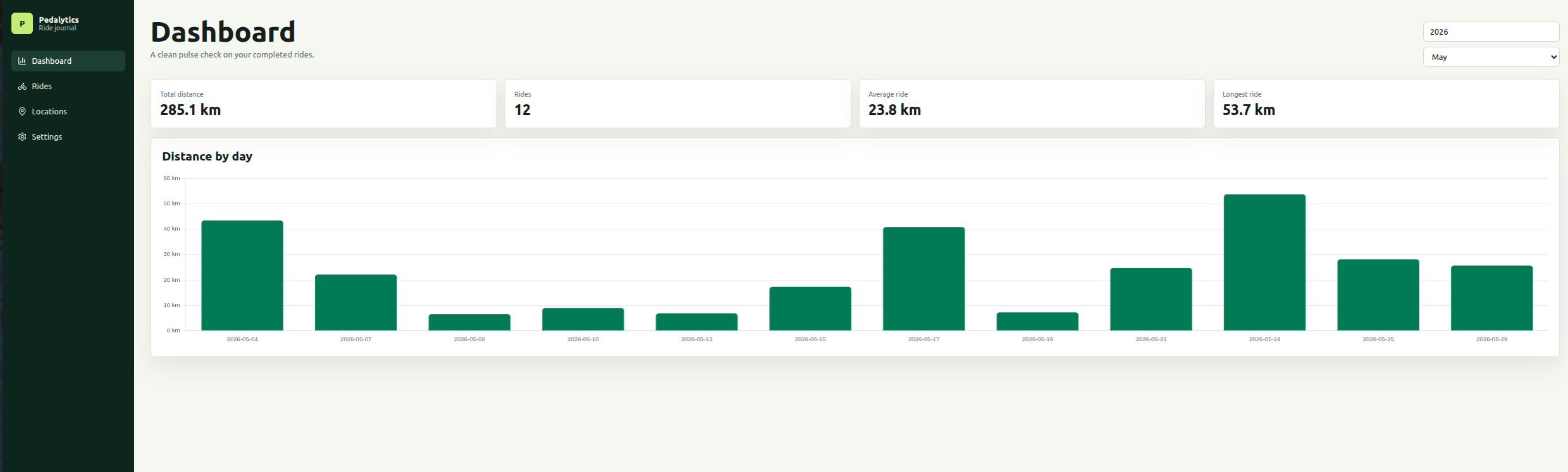
As the discussions continued, the overall shape of the MVP gradually became clearer. At the same time, I deliberately tried to prevent the scope from expanding too quickly. In particular, I intentionally kept the dashboard and analytics portion relatively limited for the first iteration. The objective of the MVP was primarily to establish a clean foundation for storing, enriching, and managing ride data rather than building a sophisticated analytics platform immediately.
3. Guiding the Architecture Instead of Micromanaging It
Another aspect that I wanted to improve compared to the Librarian project was the initial architecture generated by AI.
The first draft of Librarian had worked reasonably well functionally, but its design had leaned toward a fairly monolithic structure. While the application itself remained manageable, I still had to spend several iterations refactoring parts of the generated codebase afterward in order to move the design closer to the architecture that I originally had in mind.
For Pedalytics, I wanted to experiment with a different approach. In the Librarian project, the initial generation phase had relatively few architectural constraints and most architectural refinements happened later through iterative refactoring sessions. For Pedalytics, I decided to introduce a small set of architectural constraints directly in the seed prompt itself and observe how much structure the model could generate from that guidance alone.
The constraints themselves remained intentionally lightweight. I asked for an MVC-style organization, thin controllers, dedicated services, and adherence to SOLID principles where they made sense. I also explicitly required repository classes to focus strictly on persistence responsibilities and avoid accumulating business logic, something that had happened to some extent in Librarian.
Beyond these broad guidelines, I intentionally left a fair amount of freedom to the model. Part of the experiment was precisely to determine whether modern AI-assisted workflows could produce a reasonably structured application without requiring exhaustive architectural specifications upfront.
Once the scope, stack, and architectural constraints were sufficiently refined, I asked ChatGPT to generate the final seed prompt that would be used to bootstrap the project.
That seed prompt (shown in the appendix) was then submitted to Codex powered by GPT 5.5 configured with Medium effort settings. The generation process itself took roughly 17 minutes to complete and produced the initial MVP implementation of Pedalytics.
4. Reviewing the Generated MVP
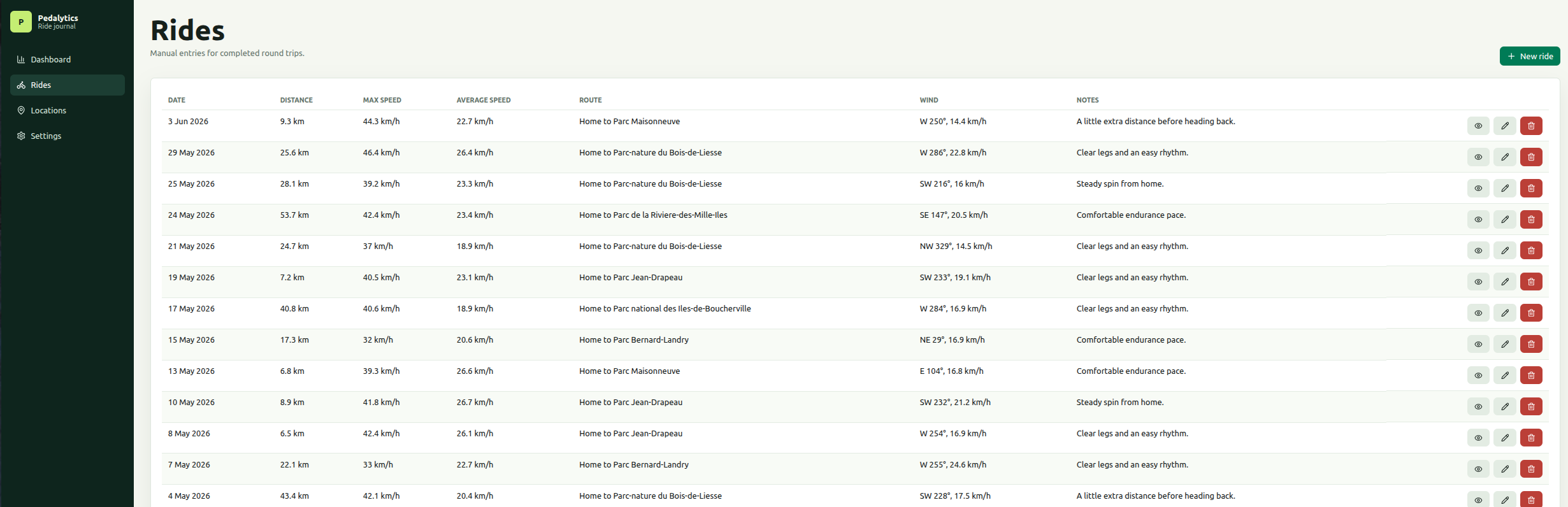
The resulting application looked solid for a first draft and already included the core functionality expected from the MVP. More importantly, the generated structure was significantly cleaner than what I had obtained during the first generation phase of the Librarian project.
One aspect that I was particularly pleased with was the overall organization of the backend. The application was structured as a vertically sliced architecture where modules represented either API resources or third-party API clients. Interestingly, this particular organizational approach was not something that I had explicitly requested. It appeared in the generated seed prompt itself as part of the architectural guidance produced by ChatGPT.
Codex generated a fairly traditional three-layer backend organization composed of Controllers, Handlers, and Repository classes.
Controllers remained intentionally thin. Their responsibilities were mostly limited to validating request payloads using Zod, delegating the operation to the associated handler, and returning the response through Fastify. In practice, controller methods closely mirrored the CRUD operations exposed by the API.
Dependency injection and route wiring were also isolated into separate files for each API resource, which helped keep the overall structure relatively easy to navigate.
Another noticeable improvement compared to the Librarian project was the role of the repository layer. Repository classes were focused strictly on persistence concerns and did not accumulate business logic. This separation had been explicitly requested before generating the seed prompt and the generated implementation followed that constraint reasonably well.
After this initial review of the generated structure, I started testing the application more thoroughly and reviewing the generated implementation in greater detail. Those aspects, along with the strengths and limitations of the generated codebase, will be covered in subsequent blog posts.
5. Appendix — The Seed Prompt
The seed prompt used to generate the initial MVP implementation of Pedalytics is reproduced below.
Goal:
Pedalytics is a single-user, single-bike cycling tracker for manually entering past rides and viewing basic statistics. Prioritize clean architecture, readable code, and a polished modern UI over feature breadth.
Tech stack:
- Monorepo
- Frontend: Svelte 5, TypeScript, Vite
- Backend: Fastify, TypeScript
- Database: SQLite
- ORM: Drizzle ORM
- Validation: Zod
- Tests: Vitest
- Charts: Chart.js
- Persistence must be server-side SQLite, not browser storage.
Architecture constraints:
- Use an MVC-inspired architecture on the backend.
- Use feature-based modules.
- Follow SOLID principles where practical.
- No generic catch-all files such as utils.ts, helpers.ts, types.ts, common.ts.
- Each file must have one clear responsibility.
- Controllers should be thin.
- Services contain business logic.
- Repositories contain database access.
- Zod schemas should be explicit and feature-specific.
- Avoid premature abstraction, but do not mix concerns.
Suggested repo structure:
pedalytics/
apps/
web/
api/
packages/
shared/
Backend suggested structure:
apps/api/src/
db/
client.ts
schema.ts
migrations/
modules/
rides/
ride.controller.ts
ride.routes.ts
ride.service.ts
ride.repository.ts
ride.schema.ts
locations/
location.controller.ts
location.routes.ts
location.service.ts
location.repository.ts
location.schema.ts
settings/
settings.controller.ts
settings.routes.ts
settings.service.ts
settings.repository.ts
settings.schema.ts
weather/
weather.service.ts
weather.schema.ts
server.ts
app.ts
Frontend suggested structure:
apps/web/src/
features/
dashboard/
rides/
locations/
settings/
lib/
api/
formatting/
app.css
main.ts
Core entities:
1. Ride
A ride is a past completed round trip:
departure location -> destination location -> departure location.
Fields:
- id
- rideDate
- startedAt, nullable
- endedAt, nullable
- distanceKm
- departureLocationId, nullable/defaultable
- destinationLocationId, nullable
- notes, nullable
- weatherTemperatureCelsius, nullable
- weatherFeelsLikeCelsius, nullable
- weatherPrecipitationMm, nullable
- weatherRainMm, nullable
- weatherWindSpeedKmh, nullable
- weatherWindDirectionDegrees, nullable
- weatherWindDirectionCardinal, nullable
- weatherCode, nullable
- weatherFetchedAt, nullable
- createdAt
- updatedAt
Distance and weather values must be persisted in metric units.
2. Location
Fields:
- id
- name
- address, nullable
- city
- provinceState
- country
- zipCode
- latitude, nullable
- longitude, nullable
- createdAt
- updatedAt
The user often visits the same locations, so locations must be reusable. Ride forms should allow choosing known locations.
3. AppSettings
Single-row settings table.
Fields:
- id
- homeLocationId, nullable
- defaultCity
- defaultProvinceState
- defaultCountry
- defaultZipCode
- defaultLatitude
- defaultLongitude
- distanceUnit, default "km"
- temperatureUnit, default "celsius"
- windSpeedUnit, default "kmh"
- createdAt
- updatedAt
MVP features:
1. Dashboard
- Modern UI using cards and Chart.js.
- Theme / color palettes suited to an app about cycling, outdoor activities
- Show summary cards:
- total distance
- number of rides
- average ride distance
- longest ride
- Show chart: distance by day.
- Add filters:
- year
- month
- Keep dashboard simple. Do not add extra analytics in the first draft.
2. Rides
- Table of rides.
- Create ride.
- Edit ride.
- Ride form fields:
- ride date
- distance in km
- start time, optional
- end time, optional
- departure location
- destination location
- notes
- Default departure location should use the configured home location when available.
- Only past rides are supported.
- Legacy imported rides in the future may have only rideDate and distanceKm, so the backend schema should allow nullable optional fields where appropriate.
3. Locations
- Table/list of known locations.
- Create location.
- Edit location.
- Delete location.
- Location fields:
- name
- address
- city
- province/state
- country
- latitude
- longitude
4. Settings
- Edit app settings.
- Configure home location.
- Configure default city, province/state, and country.
- Configure units, defaulting to metric.
Weather:
- Weather should be fetched synchronously/interactively when ride data is entered, not as a background job.
- Use departure location weather only.
- Weather is stored as a snapshot on the ride.
- Include wind direction. This is important because the user uses wind direction to decide where to ride.
- Design a weather service abstraction so Open-Meteo can be integrated cleanly.
- For the first draft, it is acceptable to implement a clean service interface and either:
- call Open-Meteo if straightforward, or
- stub the implementation clearly, leaving a TODO in the weather service only.
- Do not scatter weather API logic in controllers or frontend components.
Maps/geocoding:
- Design with Leaflet/OpenStreetMap/Nominatim in mind.
- Do not overbuild maps in MVP.
- It is acceptable for the first draft to store latitude/longitude manually.
- Keep geocoding as a later enhancement unless easy to isolate cleanly.
API requirements:
- REST API.
- Use Zod for request validation.
- Return clear validation errors.
- Implement endpoints for:
- rides CRUD
- locations CRUD
- settings get/update
- dashboard stats
- optional weather preview endpoint
Suggested endpoints:
- GET /api/rides
- GET /api/rides/:id
- POST /api/rides
- PUT /api/rides/:id
- DELETE /api/rides/:id
- GET /api/locations
- GET /api/locations/:id
- POST /api/locations
- PUT /api/locations/:id
- DELETE /api/locations/:id
- GET /api/settings
- PUT /api/settings
- GET /api/dashboard?year=YYYY&month=MM
- POST /api/weather/preview
Frontend requirements:
- Modern, clean SPA.
- Navigation:
- Dashboard
- Rides
- Locations
- Settings
- Use Svelte 5 idioms.
- Keep components focused and small.
- Separate API client code from UI components.
- Avoid large components that mix forms, API calls, formatting, and layout.
- Use simple responsive styling.
- Dashboard should feel polished but not bloated.
Testing:
- Add Vitest setup.
- Include meaningful tests for:
- Zod validation schemas
- dashboard aggregation logic
- weather wind direction cardinal conversion
- at least one service/repository where practical
- Do not write superficial tests just to increase count.
Important non-goals for MVP:
- No authentication.
- No multi-user support.
- No multiple bikes.
- No GPX/FIT import.
- No route computation.
- No live ride tracking.
- No social features.
- No complex analytics.
- No forecasting models yet.
- No browser-side persistence.
Deliverables:
- Working monorepo.
- Clear README with:
- project description
- tech stack
- how to install
- how to run frontend/backend
- how to run migrations
- how to run tests
- Seed data for a few locations and rides if useful.
- Keep the first implementation small, reviewable, and clean.